
SMTP mailing
Starting with ingenious version 5.0, multiple SMTP accounts can be configured in the program to use different sender email addresses for different applications. For example, a script can reference a specific SMTP account, or a separate sender address can be selected for each user (see Miscellaneous user details).
You can use classic SMTP accounts or accounts with OAuth 2.0 authentication (one organization).
A default SMTP account configured here will be used if no other account has been explicitly selected, and takes precedence over the SMTP account configured under Network and WebServer (compatibility with ingenious version 4.0).
The following settings must be configured here:
OAuth 2.0
| App ID | Simple input field | The ID of the version of the ingenious program registered with the provider. |
| Tenant ID | Simple input field | The client ID of the organization within the cloud environment. |
| OAuth Secretkey | Masked input field + Button | Enter the secret key set up for access here. The masked password can be displayed using the button. Only users with the appropriate permissions can view the secret key. |
| Oauth RedirectURI | Simple input field | URL at which the authorization code is received (Default for Microsoft Azure: http://localhost:5000/) |
| OAuth SMTP Server | Simple input field | The address of the SMTP server (default for Microsoft Azure: smtp-mail.outlook.com) |
| OAuth SMTP Port | Simple input field | Enter the port number used to access the server here (default for Microsoft Azure: 587) |
The OAuth 2.0 configuration applies to all SMTP accounts for which “OAuth 2.0” was selected as the sending method in the configuration.
All stored SMTP accounts are displayed in a list.
A new SMTP account can be added using the button  . An existing SMTP account can be removed using the button
  .
.
Configuring an SMTP account
| SMTP type | Selection list | Selection of the mailing type: Classic or OAuth 2.0 |
| OAuth 2.0 Address | Simple input field | For the OAuth 2.0 mailing type, the sender’s email address must be entered here. |
| SMTP Login | Simple input field | Login name for a classic SMTP account (usually the email address) |
| SMTP Password | Masked input field + button | Password for the classic SMTP account. The masked password can be displayed using the button. Only users with the appropriate permissions can view the secret key. |
| SMTP Host | Simple input filed | Server hosting the SMTP account (provider’s host URL) |
| SMTP Sender | Simple input field | Sender’s email address of the SMTP account |
| Default | Checkbox | This checkbox sets an SMTP account as the default, and the program will always use it if no other account has been defined for a user or process. |
| SSL / TLS | Checkbox | If the checkbox is activated, data transmission will be encrypted. (Depending on the provider) |
The “Test Email” button can be used to test access to the SMTP account.
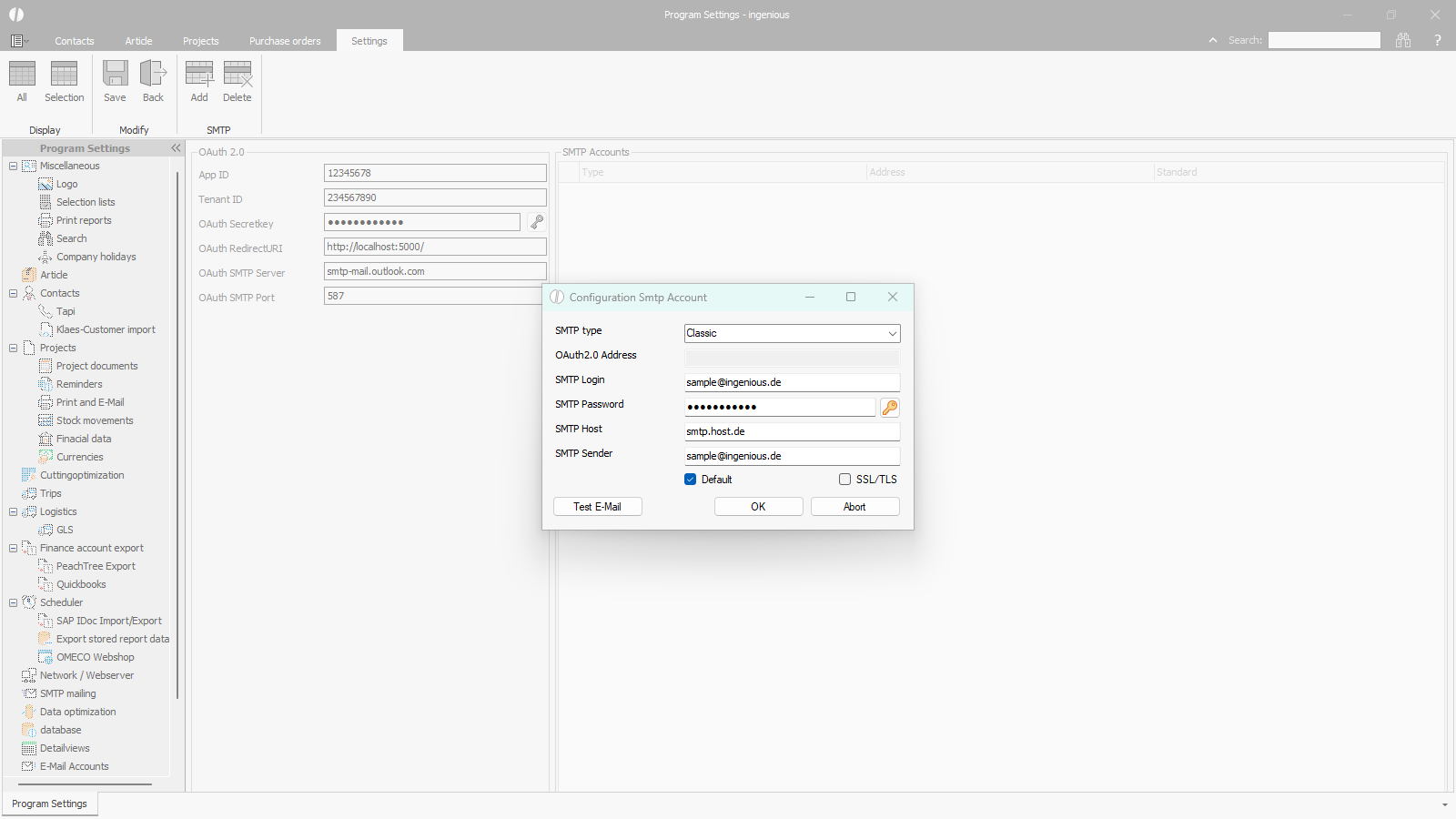 |
| Configuration SMTP Account |
Using SMTP accounts
The configured SMTP accounts are used as follows:
- For sending serial emails – Sending is always done via SMTP.
- For sending project documents when email sending via SMTP is configured under Print and E-Mail.
- For sending reminders when email sending via SMTP is configured under Print and E-Mail.
- For sending emails via script
The data is sent via the SMTP account assigned to the logged-in user (see Miscellaneous user details) or, if no account has been selected, via the default account.
Using an SMTP account in a script
The following command can be used to send an email via script:
ingenious.net.Tools.Export.SendEmail.Send(recipient, subject, body, isBodyHtml, attachmentFilenames, allowPopups, bSendMAPI, emailaddress);
The following parameters are taken into account:
| Recipient(string) | Recipient’s email address |
| Subject(string) | Email subject |
| Body(string) | The text of the email |
| isBodyHtml(bool) | Indictaion of whether it is an HTML format |
| attachmentFileNames (IEnumerable<string>) | List of filenames of the attachments |
| allowPopups(bool) | Specify whether pop-ups with potential error messages should be displayed |
| bSendMAPI(bool) | Specify whether the email should be sent via MAPI |
| emailaddress(string) | Sender’s email address / authentication address (Email address of the registered SMTP account) |
